Mustafa Farrag
If you've noticed AI Overviews popping up at the top of search results lately, you're not imagining it. Google has been rolling out AI generated answers across more and more queries, and that shift is changing how people find information, including whether they ever click through to your site at all. Tracking your AI visibility has become just as important as tracking traditional rankings, but most SEO tools still aren't built to show you what's actually happening inside these AI driven results. Search Console wasn't built for this either, at least not at first, but Google has slowly started closing that gap.
In this article, we'll walk through how to track AI Overviews and how to track AI Mode using everything Search Console currently offers, including the newer Search Generative AI performance report Google just rolled out. We'll also cover where that data falls short, since neither tool separates AI Overviews from AI Mode the way most site owners actually need. From there, we'll look at how a dedicated Google AI Overview Visibility Tool can close those remaining gaps, giving you a clearer, more complete picture of where your content stands in this new search landscape and what to do about it.
Google's New Search Generative AI Performance Reports
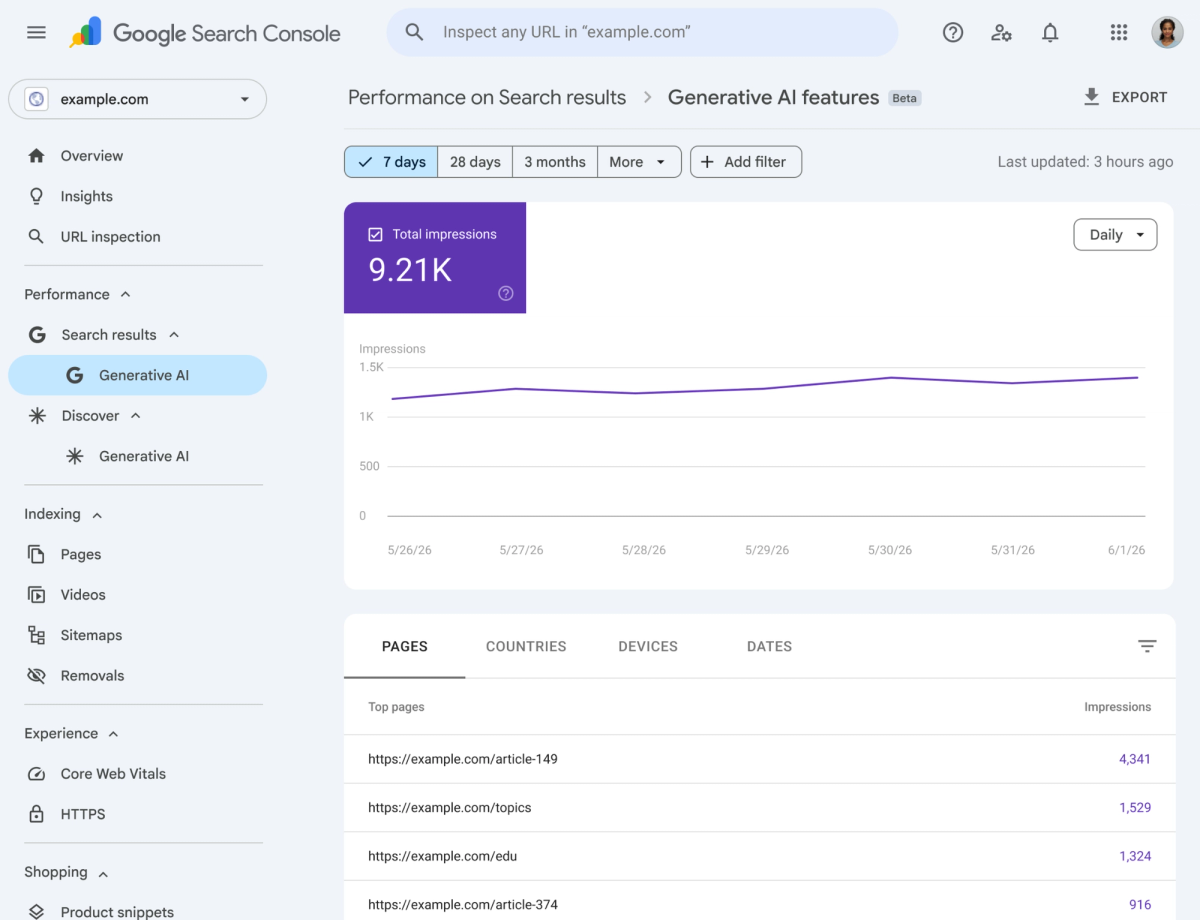
Before getting into the tracking methods themselves, it's worth understanding a recent change from Google that directly affects how this whole process works. On June 3, 2026, Google introduced a new feature inside Search Console called Search Generative AI performance reports. As of this writing, it's only available to a subset of website owners based in the UK, with no confirmed date yet for a wider global rollout, so most site owners won't see this in their account just yet. Still, it's worth understanding since it gives the first real look at how Google plans to handle AI visibility reporting going forward.
The report is built to show site owners how their content performs inside AI Overviews, AI Mode, and the generative AI features now showing up inside Discover. Until this update, all of that data sat buried inside the regular Performance report, mixed in with standard web search results. There was no way to separate it out, which made it nearly impossible to know whether your content was actually appearing inside an AI generated answer or simply ranking the way it always had. This new report changes that by giving site owners a dedicated view built specifically around AI visibility.
This shift has led SEOs to rethink how they adapt their strategies for AI-driven search, as discussed in SEO for AI search, especially as AI Overviews and generative search experiences continue to reshape visibility tracking.
The report covers a handful of useful dimensions, and it's worth knowing what you're actually getting:
- Impressions, showing how often your URLs appeared inside generative AI features across Search and Discover
- Pages, showing which specific URLs got pulled into those AI features
- Countries, giving a geographic breakdown of where that visibility is happening
- Devices, available for Search results, showing desktop versus mobile appearances
- Dates, with hourly, daily, weekly, and monthly views to track trends over time
There are a couple of important limitations to keep in mind. The report does not include click data, so you can see how often you're showing up inside AI features, but not whether that visibility is translating into actual visits. Google has said they're still evaluating which additional metrics to add over time, so this version is more of a starting point than a finished tool. The rollout is also limited for now, starting with a subset of website owners, and it's expected to expand more broadly as testing continues.
It's also worth noting that this report groups AI Overviews and AI Mode together rather than separating them. So while it gives you a much clearer picture of your overall generative AI visibility than anything Search Console has offered before, it still won't tell you definitively whether a specific impression came from an AI Overview or from AI Mode. For that level of detail, you'll still need to rely on some manual checking, which is exactly what the next two sections walk through.
How to Track AI Overviews
Since the dedicated report covers generative AI visibility as a whole rather than breaking out AI Overviews specifically, tracking this one well still takes a mix of the new reporting and a bit of manual checking. Here's how to put both to use.
Step by step guide
- Check whether you have access to the Search Generative AI performance report. If your property is part of the rollout, you'll find it as its own section inside Search Console rather than a filter inside your existing Performance report.
- Review your impressions data. Since this report groups AI Overviews and AI Mode together, treat the numbers as your overall generative AI visibility rather than an AI Overview specific count.
- Check the Pages tab. This shows which URLs are getting pulled into generative AI features most often, giving you a starting point for which content is resonating with these results.
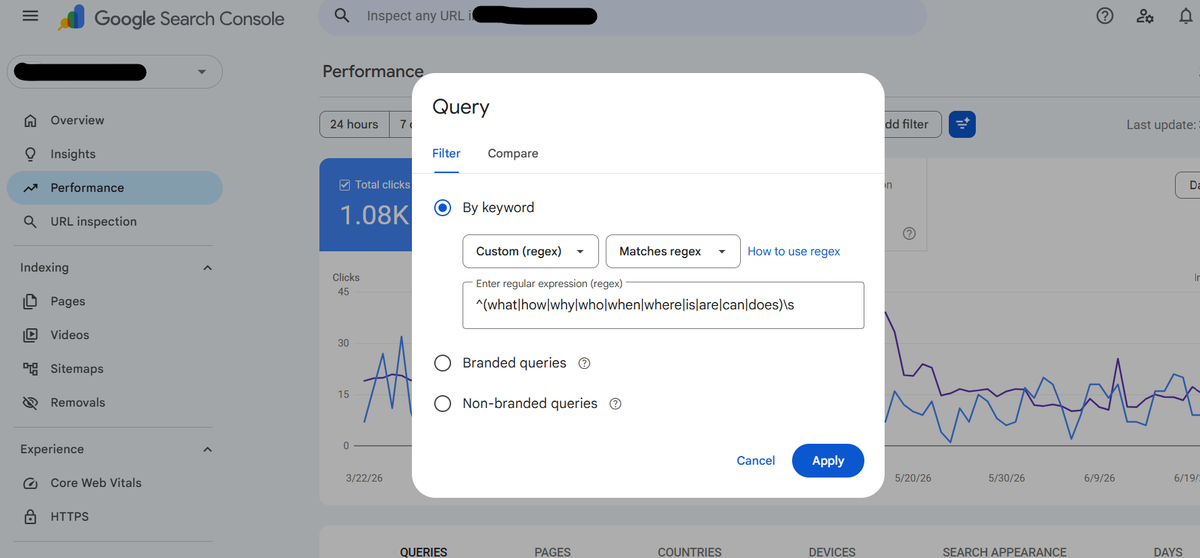
- Apply a custom regex filter to isolate long tail, question style queries. In your standard Performance report, go to the Queries tab, click "+ New filter," choose Query, then select "Custom (regex)" and use something like
^(what|how|why|who|when|where|is|are|can|does)\sto surface the question phrased searches most likely to trigger an AI Overview.
- Cross check manually for AI Overview specific confirmation. Search your target queries yourself and look for an AI Overview at the top of the results. If one appears, check whether your domain is cited among the sources.
- Log what you find. Keep a simple running list of which queries trigger an AI Overview and whether you're cited. Since the dedicated report can't isolate AI Overviews specifically, this manual log is your most reliable way to confirm it.
How to analyze the data
- Rising impressions in the new report suggest growing visibility across generative AI features overall, even without confirmation of which specific feature is responsible.
- Frequent citations in your manual checks confirm AI Overview visibility directly, since this is the one signal the report itself can't isolate.
- Recurring pages in the Pages tab are worth studying for structure and format, since those patterns tend to repeat across your best performing content.
- Mismatches between impressions and rankings can reveal pages that AI features value differently than standard search results do.
How to Track AI Mode
AI Mode sits inside that same combined impressions data, so the same starting point applies, but it behaves differently enough from AI Overviews that it's worth tracking with its own approach.
Step by step guide
- Use the same Search Generative AI performance report as your baseline. The impressions here still apply to AI Mode, just without separating it from AI Overviews.
- Look at your standard Performance report's Queries tab. Since AI Mode tends to involve longer, more conversational searches, scan for queries that read more like full questions than short keyword phrases.
- Apply a custom regex filter to catch longer, conversational queries. Click "+ New filter" on the Queries tab, select Query, choose "Custom (regex)," and use something like
^(\w+\s){7,}to filter for queries with seven or more words, since AI Mode searches tend to run noticeably longer than typical keyword searches. The number inside the curly brackets controls the word count, so you can swap the 7 for any number you want to test a different threshold. You can also combine this with a question pattern like^(what|how|why|who|when|where|which|can|should)\s.*\?$if you want to narrow it further to fully phrased questions.
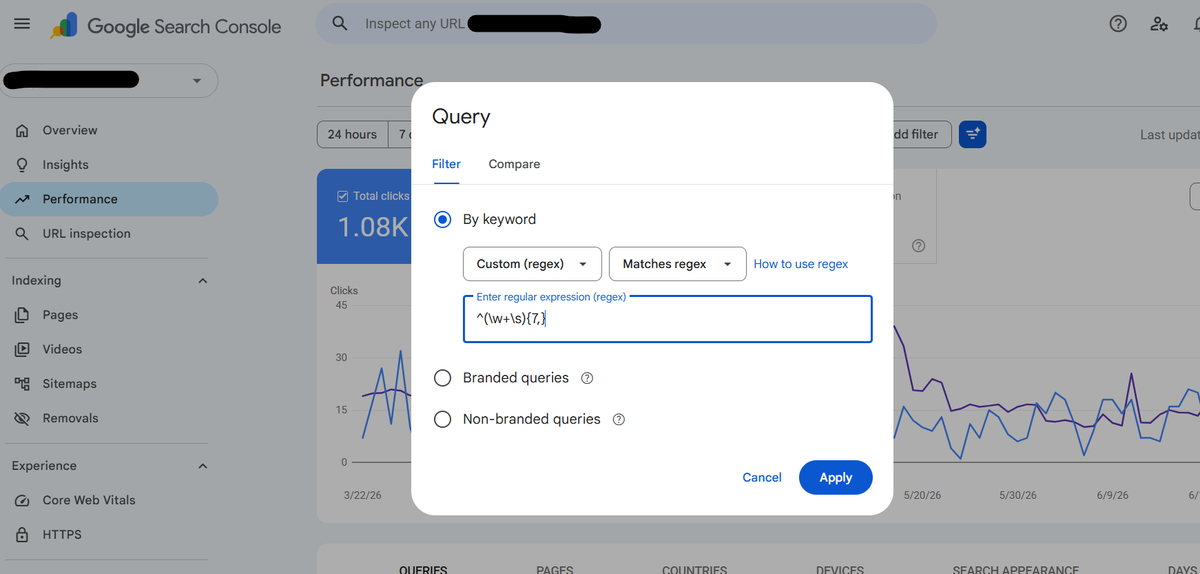
- Test your key queries directly inside AI Mode. This is currently the only reliable way to confirm AI Mode specific visibility, so search your target topics there and see whether your content gets pulled in as a source.
- Note which pages surface during testing. AI Mode often draws from multiple sources to build a single response, so pages that don't usually rank well in standard search may still show up here.
- Repeat this regularly. AI Mode is still expanding to more users and query types, so what you confirm today is worth rechecking every few weeks.
How to analyze the data
- Longer, conversational queries in your Queries tab are a hint that AI Mode may be involved, even though Search Console won't label them that way.
- Unexpected pages appearing during manual testing point to content Google finds useful for synthesis, regardless of how it ranks normally.
- Consistency across repeated tests matters more than any single check, since AI Mode results vary from query to query.
- Comparing findings over time is the most practical way to track movement until a dedicated AI Mode report exists.
Google AI Overview Visibility Tool
All of this manual checking works, but it has an obvious limit, you can only test so many queries by hand before it stops being practical. If you're tracking more than a handful of keywords, or trying to keep an eye on competitors at the same time, you need something built specifically for this. That's where a dedicated Google AI Overview tracker earns its place, and AI Peekaboo is a solid go to option here.

Instead of you running searches one by one, an AI Overview tracker like this runs your tracked prompts daily and shows you which source URLs Google's AI Overview actually cites for each one. Here's what that gets you:
- A real citation rate, basically your share of voice inside AI Overviews, so you can see exactly how often your brand shows up compared to competitors in the same space
- A full breakdown of every domain being cited and how often, which helps you spot patterns, like a competitor consistently outranking you for citations even when your blue link ranking is fine
- A side by side view of your Search Console impressions and clicks over time, so you can see the moment an AI Overview starts pulling clicks away from your organic results instead of just suspecting it
AI Peekaboo also includes a dedicated AI Mode tracker rather than lumping AI Mode in with AI Overviews, which solves the exact problem we ran into with Search Console earlier. Since AI Mode is conversational and multi-turn, a brand can show up in someone's first question and disappear by the third. Here's how an AI Mode tracker handles that:
- Tracks visibility across each turn of a conversation, not just the first response, so you can see where you hold your position and where you drop off
- Gives AI Mode its own daily score, separate from the AI Overview score, so the two surfaces don't get blended into one misleading number
- Surfaces trend lines for each surface independently, making it easy to spot when one is rising while the other stays flat
For anyone relying on the methods covered earlier in this article, manual checks and the limited generative AI performance report, an AI Overview tracker and AI Mode tracker like this fill in the gaps Search Console still can't close on its own.
Final Thoughts
AI Overviews and AI Mode aren't going anywhere, and if anything, they're only going to take up more space in how people search. Search Console is finally catching up to that reality with the new Search Generative AI performance report, but as we covered, it still groups both features together and leaves out click data entirely. That's useful for spotting overall trends, but it won't give you the specific, query level confidence you need to know exactly where you stand.
That gap is exactly why manual checks and dedicated tools like AI Peekaboo's AI Overview tracker and AI Mode tracker matter right now. Until Google decides to separate this data on its own, combining what Search Console gives you with daily, automated tracking is the most reliable way to actually understand your AI visibility instead of guessing at it. Start with what's already sitting inside Search Console, fill in the blanks with manual testing where you can, and bring in a dedicated tracker once you're ready to monitor this at scale. That combination is what will keep you ahead as AI generated results continue to reshape how your content gets found.
Frequently Asked Questions
Can Google Search Console track AI Overviews?
Partly. Search Console was not built for AI results, but Google has slowly been closing that gap, and you can track both AI Overviews and AI Mode using what the tool currently offers. The data still falls short in important ways.
What are Search Generative AI performance reports?
A Search Console feature Google introduced on June 3, 2026 that gives the first real look at how it plans to report AI visibility. It is currently limited to a subset of website owners based in the UK, with no confirmed date for a wider rollout.
Does Search Console separate AI Overviews from AI Mode?
No. Neither the existing performance data nor the new Search Generative AI report splits AI Overviews from AI Mode the way most site owners actually need. That gap is the main reason a dedicated tool is usually needed alongside it.
Why do most SEO tools miss AI visibility data?
Most SEO tools were built to report traditional rankings, not what happens inside AI driven results. Google has rolled out AI generated answers across more and more queries, which changes whether people ever click through to your site at all.
Do I need a separate tool to track AI Overviews?
Usually yes. Search Console gives you a starting point but leaves clear gaps, especially in separating AI Overviews from AI Mode. A dedicated Google AI Overview visibility tool closes those gaps and shows a more complete picture of where your content stands.