Put AI visibility in the dashboard leadership already reviews.
Bring visibility scores, citation sources, and tracked prompts from completed runs into Looker Studio with a dedicated project-scoped key.
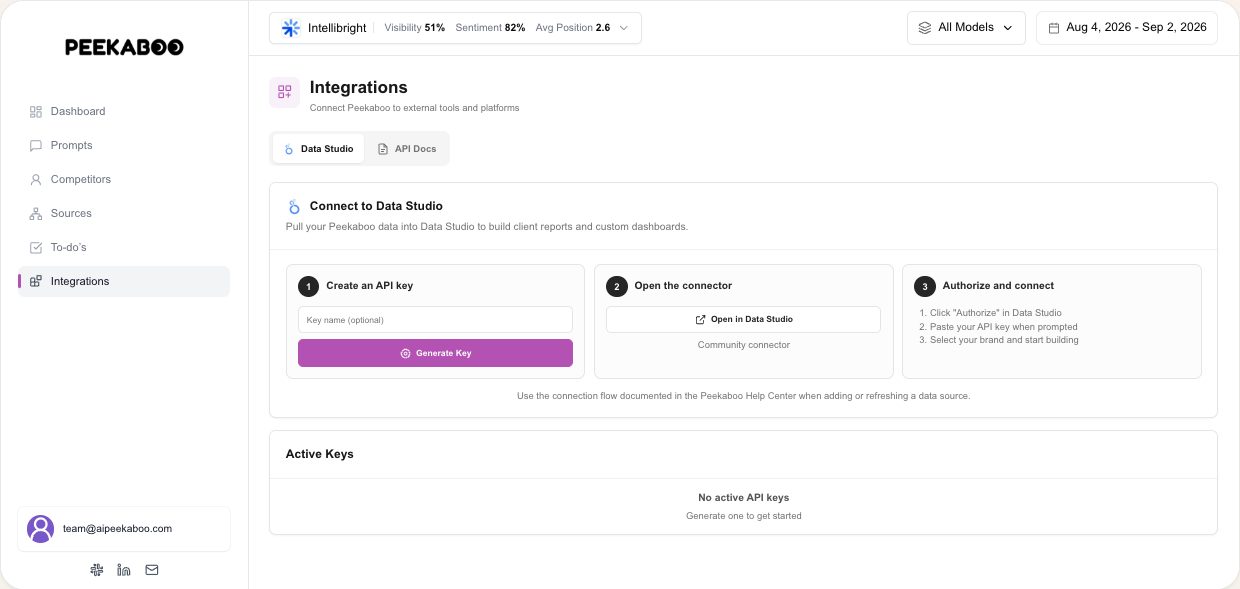
Looker Studio Connector
AI visibility lives in a separate dashboard, so it disappears from the recurring marketing review where search, traffic, and campaign decisions are made.
What the connector supports
- Native Looker Studio Community Connector (Apps Script)
- Select the available brand and fields needed for the report
- Server-side filtering and caching support the connector workflow
- Generate a dedicated Looker key from the supported integration settings
Fields available for reporting
| Dimensions | Metrics |
|---|---|
| Date | AI Visibility Score |
| Brand Name | Total Citations |
| Source Domain | AI Responses Analyzed |
| Tracked Prompt |
Brand the report in Looker Studio
Brand the Looker Studio report for your client. The connector is available on paid plans. Peekaboo product white-labeling follows separate plan or configuration eligibility.
Setup
- 1
Generate a Looker API key
Open Settings → Integrations → Looker Studio and generate the dedicated project-scoped key.
- 2
Add the community connector
Open the Peekaboo community connector from our setup page and authorize it with your generated key.
- 3
Build your report
Choose the supported dimensions and metrics, then add the time range, filters, and explanatory context your audience needs.
Pay for what you track, nothing else
Move the sliders and your price updates as you go. Every plan starts at $30 a month.
Your price
The Only Plan
Updating your price…
1 brand 40 prompts checked every 2 days on 3 AI models
Free report: no credit card. Monitoring is separate. Book a demo.
Included in every plan
- Competitor share of voice
- Sentiment and framing analysis
- Citation sources per answer
- Looker Studio reporting
- Workspace seats
- Prompt suggestions built in
- White-label reportsfrom $100/mo
- Share linksfrom $100/mo
Change plans or cancel from your dashboard, any time.
Each brand gets its own prompts, competitors and dashboard.
The questions you want to rank for in AI answers.
Track fewer models and your price drops with them.
 Claude API
 Microsoft Copilot
How often we re-run every prompt across the models you track.
Want a plan that suits your budget? Adjust the number of prompts and tracking frequency
Questions, answered
What does setup require?
Generate the dedicated key in Peekaboo, authorize the community connector, select an available brand, and configure the supported fields in your Looker Studio report. Google account and report permissions can affect the setup.
Is it included with my plan?
Yes. The Looker Studio connector is included on every paid plan.
Can I brand the dashboard for a client?
Yes. You control the logo, colors, layout, and sharing settings in your own Looker Studio report. This is separate from Peekaboo product white-labeling.