Filipe Lins Duarte
We work with 100+ companies, and one of the questions we get asked the most by our clients is: How can we track traffic from ChatGPT?
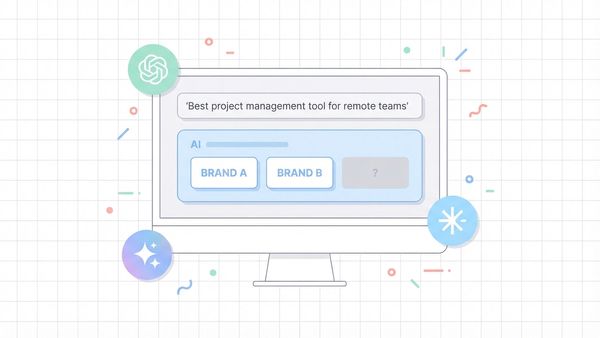
The shift from traditional search engines to AI answer engines has fundamentally changed digital marketing. As platforms like ChatGPT become primary information sources, the "black box" of AI traffic attribution is a growing challenge for brands.
Marketers often see spikes in "Direct" traffic or unassigned referrals that actually originate from Large Language Model (LLM) recommendations. Without proper tracking, you are flying blind in the era of Generative Engine Optimization (GEO).
In this article I am going to talk about how you can accurately attribute, track, and optimize traffic originating from ChatGPT and other AI models.
Why is Tracking Traffic From ChatGPT Important
In 2026, AI answer engines are not just supplementary tools; they are primary discovery channels. Unlike traditional search engines that list links, AI models synthesize answers. Understanding how AI models construct their responses with fan-out queries is key to knowing why some brands get cited and others don't.
However, default analytics setups often fail to capture this data. Traffic from ChatGPT can appear as:
Direct Traffic: If the referral string is stripped for privacy.Referral Traffic: If the user clicks a citation link directly.Dark Social: If the user copies a link from the chat and pastes it into a browser.
Failing to track this channel means you cannot calculate ROI on your brand building or GEO efforts. You risk underinvesting in the very platforms where your customers are making decisions. By implementing a multi-layered tracking strategy, you gain visibility into how your brand is being recommended by AI, allowing you to defend your market share and optimize your Share of Voice.
Method 1: Ask Your Customers
Qualitative data is often the fastest way to bridge the gap left by quantitative analytics tools. While analytics software tracks clicks, talking to customers reveals the intent and the specific context of the discovery.
If you are a B2B founder or marketing leader, leverage your human touchpoints. Instruct your sales and customer success teams to explicitly ask prospects about their research process. Do not just ask "How did you find us?" dig deeper.
Questions to ask during sales calls:
- "Did you use any AI tools like ChatGPT or Perplexity to research solutions in this space?"
- "What specific questions did you ask the AI to find us?"
- "How did the AI describe our product compared to competitors?"
This feedback loop does two things. First, it confirms if AI is a viable channel for you. Second, and more importantly, it reveals the prompts users are inputting. Knowing the specific queries (for example, "best CRM for small agencies") allows you to reverse-engineer your content strategy to rank better for those specific AI responses.
Method 2: Product Onboarding Attribution
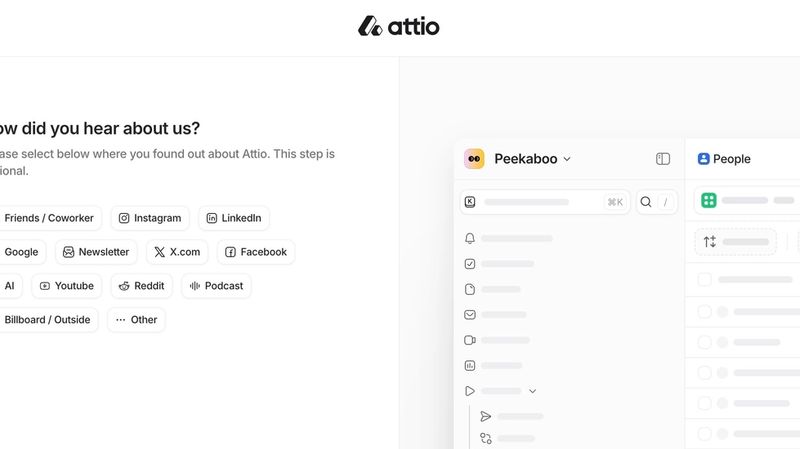
Self-reported attribution is a powerful method to capture "dark" traffic that analytics tools miss. By integrating specific questions into your product sign-up or onboarding flow, you can capture data at the moment of conversion.
Leading SaaS companies like Attio, Wispr Flow, and Framer have already adapted to this reality. They no longer rely solely on a generic "Search" option. Instead, they include specific checkboxes for "ChatGPT," "AI Recommendation," or "Gemini."
Implementation Steps:
- Update your "How did you hear about us?" survey: Add distinct options for "ChatGPT" and "AI Search."
- Use open-text fields: Allow users to specify which tool they used if they select "Other AI."
- Analyze the disconnect: Compare self-reported AI attribution against your Google Analytics referral data. You will likely find that self-reported numbers are significantly higher, exposing the volume of traffic that software is miscategorizing as "Direct."
This method provides a high-fidelity signal that validates your investment in AI visibility, even when tracking pixels fail.
Method 3: Google Analytics 4 Filtering
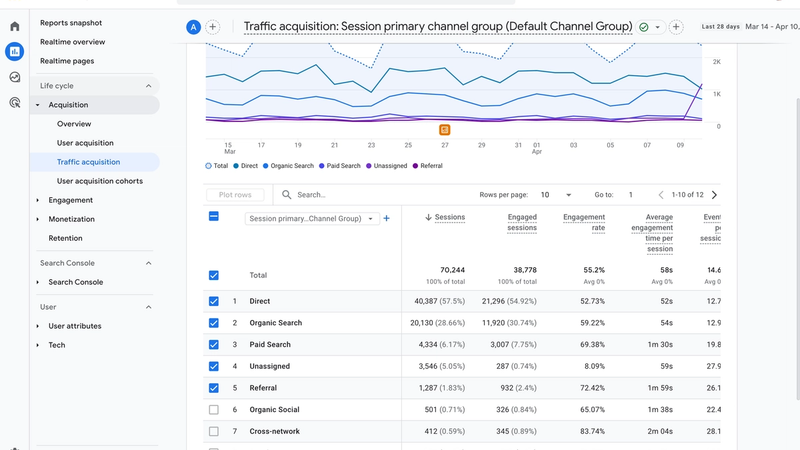
While direct feedback is valuable, you still need scalable, quantitative data. Google Analytics 4 (GA4) can track ChatGPT traffic, provided you configure your filters correctly to catch referral parameters.
To set this up, navigate to Reports > Acquisition > Traffic Acquisition in your GA4 dashboard.
Step-by-Step Configuration:
- Change Primary Dimension: Click the dropdown above the table (usually defaults to "Session default channel group") and select Session Source/Medium.
- Apply a Filter: Use the search bar above the table to filter for AI sources. Typing chatgpt will typically reveal sources like chatgpt.com / referral or chat.openai.com / referral.
- Create a Custom Segment: To monitor this regularly without re-filtering, create a "Looker Studio" report or a saved comparison in GA4 that isolates this traffic.
Important Limitation:Referral data from AI is often volatile. Privacy updates or app-based usage (for example, using the ChatGPT iOS app) often strip referral headers, causing this traffic to fall into "Direct." Therefore, GA4 should be viewed as the floor of your AI traffic volume, not the ceiling.
Method 4: AI Visibility Optimization Platforms
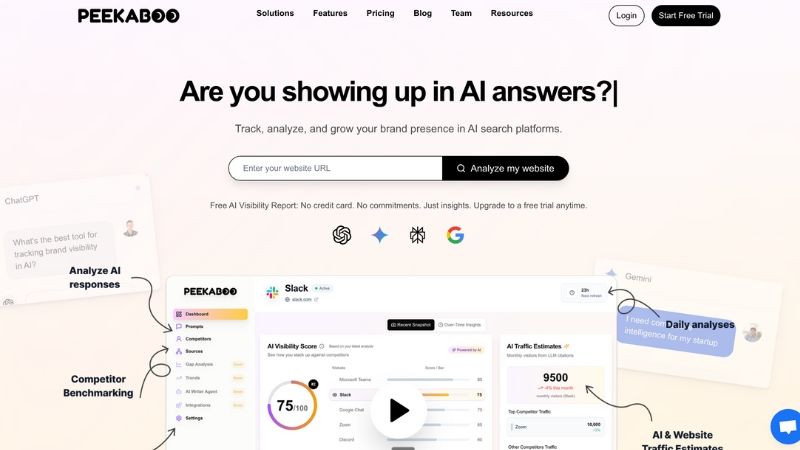
Manual tracking in GA4 and customer surveys are reactive. They tell you what happened after a user clicked. They do not tell you how often you were mentioned but not clicked, or how your brand sentiment compares to competitors in AI answers.
To truly manage this channel, you need an AI search visibility platform like Peekaboo.
Peekaboo operates like an SEO tool for the LLM era. It automates the tracking of thousands of prompts across major models (ChatGPT, Gemini, Perplexity, Google AIO) to provide actionable intelligence.
Why use a platform like Peekaboo?
- Share of Voice Tracking: See exactly how often your brand appears in recommendations compared to competitors.
- Sentiment Analysis: Understand if the AI is recommending you positively, neutrally, or negatively.
- Prompt Discovery: Peekaboo suggests the high-value prompts your customers are actually using, removing the guesswork from your optimization strategy.
- Ranking Data: Just like tracking keyword rankings in Google, you can track your "position" in AI lists and recommendations.
By using one of the best AI monitoring tools for marketing teams, you move from passively hoping for referrals to actively optimizing your presence in the answers that drive them.
Best Practices for tracking traffic from ChatGPT
Relying on a single method leaves gaps in your data. The most sophisticated marketing teams use a "triangulation" approach to get the full picture of their AI performance.
The Triangulation Strategy:
- The Quantitative Floor (GA4): Use Google Analytics to track confirmed clicks and conversions. This gives you hard data on traffic that retains referral strings.
- The Qualitative Context (Surveys/Sales): Use onboarding surveys and sales conversations to capture the "dark" traffic and understand the why behind the search.
- The Visibility Metric (Peekaboo): Use an AI analytics platform to monitor your overall market presence, ensuring you are appearing in answers even when users don't click immediately.
By combining technical rigor in GA4 with the specialized insights of a platform like Peekaboo, you can turn the chaos of AI traffic into a measurable, optimizable growth channel.
Tracking ChatGPT referrals is one piece of the puzzle. For the full picture, including brand mentions and citation share, how to measure AI visibility takes you through every metric worth tracking.
Frequently Asked Questions
Why doesn't ChatGPT traffic show up in my analytics?
Most of it lands in the Direct channel or as unassigned referrals, so it looks like visitors typed your URL. That is why marketers see Direct spikes that actually came from large language model recommendations, and why attribution needs a deliberate setup.
How do I track traffic coming from ChatGPT?
Four methods work together: ask customers directly on sales calls, add an attribution question to product onboarding, configure Google Analytics 4 filtering to isolate AI referrals, and use an AI visibility platform to see where your brand appears in answers.
Can I track ChatGPT traffic in Google Analytics 4?
Yes. GA4 filtering is one of the four methods, and it means configuring GA4 to separate AI referrals from the Direct channel where they otherwise hide. It works best combined with customer surveys and an onboarding attribution question.
Is asking customers a reliable way to attribute AI traffic?
It is one of the most practical options available. Sales call questions and a product onboarding attribution field capture the source that analytics misses, because ChatGPT referrals frequently arrive with no usable referrer data attached to them.
Why use an AI visibility platform to track ChatGPT traffic?
Analytics shows you visits but not why they happened. A platform like Peekaboo covers the visibility side, so you can connect where your brand appears in AI-generated answers with the Direct traffic that analytics cannot attribute on its own.